Okay, let's talk about something that trips up almost everyone new to SEO. You publish a shiny new blog post, refresh Google a few times, and… nothing. It's not showing up. So you start Googling why, and suddenly you're hit with two confusing terms: crawling and indexing. And nobody really explains them properly.
Are they the same thing? Different steps? Does one happen before the other? And why does it matter?
Here's the short version. Crawling and indexing are two completely separate steps in how Google (and every other search engine) figures out what your website is about. Miss either one, and your pages basically don't exist in search results. Understanding the difference between them isn't just useful, it's honestly one of the most important things you can learn if you want your site to actually rank.
So in this article, I'm going to explain it in plain English. No jargon walls. No overcomplicated diagrams. Just a real explanation of how search engines find your website, why some pages get indexed while others don't, and how you can make sure your best content actually shows up on Google.
What Are Search Engines Actually Doing?
Before we split hairs between crawling and indexing, let's zoom out for a second. What is a search engine even trying to do?
Simple. It's trying to answer people's questions as fast and accurately as possible. To do that, it needs to know what's on the internet. All of it. Which is a wild task when you think about how many billions of pages exist.
So Google (and Bing, and every other search engine) uses automated programs called bots (or "spiders," if you want to sound old-school) to explore the web. That's where crawling and indexing come in. They're the two main jobs those bots do.
What Is Crawling?
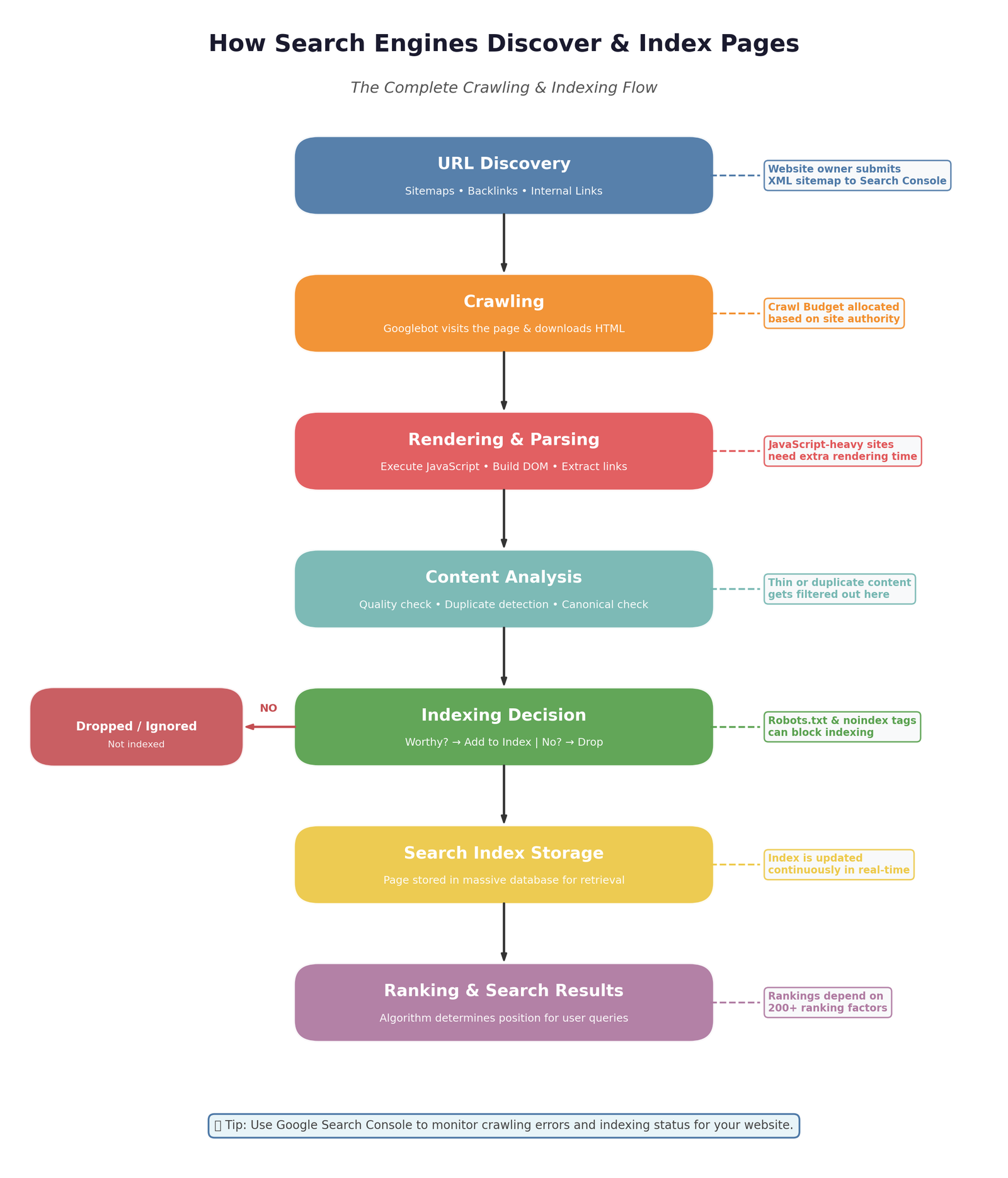
Crawling is basically the discovery phase. It's the step where search engines go out and find pages on the internet.
Here's how it works in real life. Google's crawler, called Googlebot, starts with a list of known URLs. It visits those pages, reads the content, and follows every link it finds on them. Each new link leads to more pages, which lead to more links, which lead to more pages. It's kind of endless.
Think of a crawler like someone reading a book, and every time they see a footnote, they immediately jump to the next book, and then the next one. Forever.
Some quick facts about crawling:
- Every website has a "crawl budget," which is basically how many pages Google will crawl in a given time
- Crawling doesn't mean your page will show up in search results (that's indexing)
- Crawlers follow links, sitemaps, and other signals to find new pages
- Some pages get crawled daily, others rarely at all
If a page can't be crawled, it definitely won't be indexed. So crawling is step one of the whole thing.
What Is Indexing?
Indexing is where the magic actually happens. It's the step where search engines process the content they crawled and decide, "Okay, this page belongs in our library." Or, sometimes, they decide it doesn't.
When Google indexes a page, it:
- Analyzes the content (text, images, structure)
- Understands what the page is about
- Notes the keywords and topics
- Evaluates quality, structure, and relevance
- Stores it in its massive database
Only indexed pages can appear in search results. If your page has been crawled but not indexed, it's basically invisible.
Here's the fun part. Google doesn't index everything it crawls. It has quality standards. If your page is thin, duplicated, low-value, or clearly automated, Google might just skip indexing it. And this is way more common than most people realize.
Crawling vs Indexing: The Big Difference
Let's break it down as simply as possible.
- Crawling = Google finds your page
- Indexing = Google decides your page is good enough to store and rank
Crawling is discovery. Indexing is qualification.
Think of it like a job interview. Crawling is the recruiter finding your resume. Indexing is them actually reading it and deciding you're worth adding to their shortlist. If they never find your resume, you're out. If they find it but toss it in the trash, you're also out. You need both.
How Google Actually Finds Your Website
Now that you understand the two steps, let's talk about how they play out in real life. When you launch a new website or publish a new page, Google finds it in three main ways:
- Through your XML sitemap submitted in Google Search Console
- By following links from other websites or from within your own site
- Through manual requests like the "Request Indexing" button in Search Console
Google prefers sites that make discovery easy. A clean sitemap, strong internal linking, and a few external backlinks make a huge difference in how fast your pages get crawled and indexed.
Why Some Pages Don't Get Indexed
This is where a lot of people get frustrated. You published the page. Google saw it. But it still isn't in search results. Why?
Here are the most common reasons:
- The page is set to noindex (either on purpose or by accident)
- It's blocked in robots.txt
- Your content is too thin or too similar to other pages
- The page loads too slowly or has technical errors
- There aren't enough internal or external links pointing to it
- Google considers the content low quality
- Your site has trust or authority issues
Most of these are fixable. But you have to know which one is affecting your page before you can fix it. Google Search Console's "Page Indexing" report is your best friend here. It literally tells you why each page didn't make it in.
How to Get Your Pages Indexed Faster
If you want to speed things up, here's what actually works:
- Submit your sitemap to Google Search Console
- Manually request indexing for important pages
- Improve internal linking so Google can crawl your site more easily
- Publish high-quality, useful content, not thin or duplicate stuff
- Fix technical issues like slow speed or crawl errors
- Get a few high-quality backlinks pointing to new pages
- Keep your content updated and refreshed
Also, patience helps. New sites sometimes take longer to get indexed simply because Google doesn't trust them yet. That's normal. It gets better with time and consistent quality.
How to Check If Your Page Is Indexed
You don't have to guess. There are a couple of easy ways to find out.
Option 1: Type this into Google: site:yourdomain.com/page-url
If it shows up, your page is indexed. If it doesn't, it isn't.
Option 2: Use the URL Inspection tool in Google Search Console. Just paste in your URL, and it'll tell you exactly what Google sees, whether it's crawled, whether it's indexed, and any issues it found.
Honestly, Search Console is one of the most powerful free tools out there. If you're serious about SEO, get familiar with it.

Common Myths About Crawling and Indexing
Let's clear up a few things that people constantly get wrong.
- Myth: If Google crawls my page, it will rank it. Nope. Crawling doesn't mean indexing. Indexing doesn't mean ranking.
- Myth: All my pages should be indexed. Not really. Some pages (like tag archives or thank-you pages) are actually better off not being indexed.
- Myth: Submitting a sitemap forces Google to index everything. It doesn't. It just makes discovery easier. Google still decides what to index.
- Myth: The more pages, the better. Quality always beats quantity. A hundred great pages outperform a thousand thin ones every time.
Why This Matters for Your SEO
Understanding crawling and indexing isn't just theory. It's directly tied to your traffic. If your pages aren't being crawled, they can't be indexed. If they aren't indexed, they can't rank. If they can't rank, you don't get traffic. Simple as that.
Most SEO problems I audit come back to this one issue in some way. Broken links stopping crawlers. Bad structure hiding pages. Noindex tags left on by accident. Thin content getting skipped. You'd be shocked how often these small things quietly kill entire websites.
The good news? Once you understand how the system works, fixing it becomes way easier.
Final Thoughts
Crawling and indexing might sound technical, but they're honestly not that complicated once you get the basics. Crawling is Google finding your page. Indexing is Google deciding to actually store it. Only indexed pages can rank. That's the whole story.
If you want your site to grow in 2026, don't just focus on writing content. Make sure Google can actually find it, understand it, and add it to its index. Those "invisible" parts of SEO are what separate websites that grow quietly and steadily from ones that keep publishing but never rank.
My honest advice? Log into Google Search Console today. Look at your indexing report. Fix what needs fixing. It's one of the smartest hours you can spend on your website this month.
🎥 Watch Video Tutorial
Frequently Asked Questions
1. What is the difference between crawling and indexing?
Crawling is when search engines discover your pages. Indexing is when they process and store those pages in their database so they can appear in search results.
2. Can a page be crawled but not indexed?
Yes, and it happens all the time. Google might find a page but decide it's low quality, too thin, duplicate, or blocked, so it doesn't add it to the index.
3. How long does it take Google to index a new page?
Anywhere from a few hours to a few weeks. New websites tend to take longer because Google hasn't built up trust in them yet.
4. How do I know if my page is indexed?
Search site:yourdomain.com/page-url on Google, or use the URL Inspection tool in Google Search Console for a detailed answer.
5. Does submitting a sitemap guarantee indexing?
No. Sitemaps help Google find your pages faster, but Google still decides whether to index them based on quality and other factors.
6. What is a crawl budget?
It's the number of pages a search engine is willing to crawl on your website in a given period. Bigger, more authoritative sites get bigger crawl budgets.
7. Should I block certain pages from being indexed?
Yes. Pages like thank-you pages, admin areas, or duplicate archives usually shouldn't be indexed. It keeps your site cleaner and helps important pages rank better.
8. Can I speed up indexing manually?
Yes, using the URL Inspection tool in Google Search Console and clicking "Request Indexing." It doesn't guarantee instant indexing, but it does help.
9. Does poor content quality affect indexing?
Absolutely. Google's newer systems are much stricter about content quality. Thin, low-value, or spammy pages often don't get indexed at all.
10. Why is my page not being indexed by Google?
Most common reasons include noindex tags, robots.txt blocks, thin content, technical errors, or lack of internal and external links pointing to the page.