Alright, real talk. The first time someone told me I needed a "sitemap," I nodded like I understood and then quietly Googled it later. It just sounded like one of those techy words people throw around to feel smart. But once I actually figured out what it was, I honestly felt a little annoyed that nobody had explained it sooner. Because it's not complicated. And it makes a huge difference.
I've worked on websites that sat on Google's radar for months getting nowhere. Fresh content, decent design, still crickets. And nine times out of ten, the missing piece wasn't some genius SEO strategy. It was a sitemap. Just a tiny file doing quiet, unglamorous work in the background.
So here's what I want to do with this article. I'll walk you through what a sitemap actually is, why it matters way more than most people give it credit for, and how you can set one up without needing to be a developer. No fluff. No jargon dump. Just the stuff that actually helps.
By the end, you'll know what a sitemap does, how to make one, and how to hand it over to Google properly. Cool? Let's dig in.
What Is a Sitemap, Really?
Okay, simplest way I can put it. A sitemap is like a menu for your website. It's a little file that tells search engines, "Hey, these are all the pages I have, here's when I last touched them, and here's what actually matters." That's it. That's the whole thing.
Picture this. You walk into one of those massive IKEA-sized stores with no signs anywhere. You'd probably give up and leave, right? That's exactly how Google feels when it lands on a website with no sitemap. Sure, it might find a few pages by wandering around, but it's slow, messy, and it usually misses stuff.
Most sitemaps are written in XML. Don't panic, you don't need to touch code. Just know that XML is basically a clean, tidy format that Google can read super fast. Almost every modern platform builds it for you automatically these days, which is kind of a blessing.
Why Sitemaps Matter So Much
Here's something people don't realize. Google isn't sitting there watching every website like a hawk. It has to discover your pages, and it does that by sending out little bots that hop from link to link. If your site is new, or your internal linking is weak, or you just launched a fresh blog post, those bots might not find it for a long, long time.
That's where a sitemap steps in. Instead of making Google play detective, you just hand it a list. "Here's everything. Go check it out." It's the easiest favor you can do for a search engine, and honestly, Google rewards sites that make its job easier.
Here's why they matter in plain terms:
- Brand new sites actually get discovered instead of sitting in the void
- Google gets a clearer idea of which pages matter to you
- Your fresh blog posts get picked up faster (sometimes within hours)
- Big websites don't lose pages in the shuffle
- Google sees when things were last updated, so it can re-crawl smart
If you publish more than once a month, or if your site has grown past ten pages or so, not having a sitemap is honestly leaving free traffic on the table.
Different Types of Sitemaps
Now, this is where it gets a little more interesting. There isn't just one type of sitemap. There are a few, and they each do their own thing.
- XML Sitemap: The classic. This is the one made for search engines. If someone says "sitemap" without adding anything else, this is what they mean 99% of the time.
- HTML Sitemap: This one's for actual humans. It's a page on your site that links to all your other pages. Useful for big sites with a lot of navigation.
- Image Sitemap: Great if your site is image-heavy. Think photographers, ecom stores, portfolios.
- Video Sitemap: Helps Google understand and rank your video content.
- News Sitemap: Made for news publishers who need stuff indexed fast, sometimes within minutes.
Most people reading this? An XML sitemap is going to be more than enough. The others are nice-to-haves depending on what kind of site you run.
How a Sitemap Actually Works
Alright, let's peek behind the curtain for a second. When Google crawls the internet, it's looking for hints. Signals. Clues about what's important. A sitemap is basically the loudest, clearest signal you can throw its way.
Here's how the whole thing plays out, step by step:
- You (or your CMS) creates a sitemap file, usually called sitemap.xml
- It gets dropped into the root folder of your website
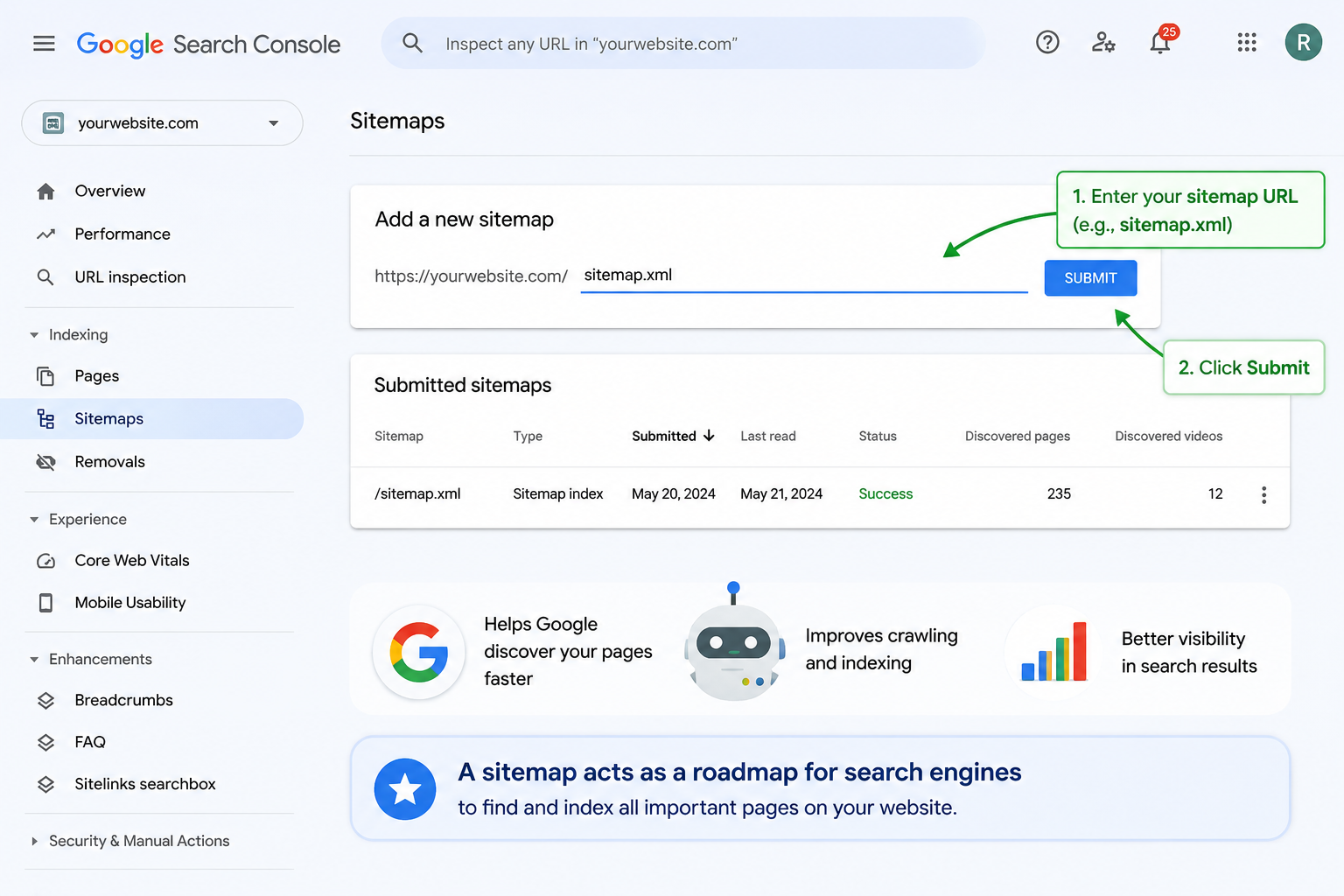
- You submit it inside Google Search Console
- Google reads the whole list and lines those pages up for crawling
- Google crawls each page, judges it, and decides what to actually index
Now here's the part people always miss. A sitemap doesn't force Google to index anything. It just says, "This exists. Take a look." Whether Google actually puts it in the index still depends on content quality, page speed, and whether it thinks your page is worth showing to real users.
Do Small Websites Need a Sitemap Too?
Short answer? Yeah. Absolutely.
There's this weird idea floating around that sitemaps are only for big brands with thousands of pages. Total myth. If anything, small websites need them more, because they don't have the authority or backlinks that trick Google into visiting often.
Think about it this way. If your site is brand new, Google barely knows you exist. It's not going to swing by every day like it does for CNN or Wikipedia. But if you hand it a sitemap? Now you've given it a reason to check in. You've made yourself visible.
Even if you're running a tiny personal blog or a five-page portfolio, a sitemap takes ten minutes to set up and can save you weeks of waiting. It's one of those low-effort, high-return things. No brainer, honestly.
How to Create a Sitemap
Good news. Nobody's expecting you to write one by hand. Unless you enjoy pain, don't do that. There are way easier ways depending on what you're using.
- WordPress: Just install Yoast SEO, Rank Math, or All in One SEO. Any of them. They generate a sitemap for you automatically the second you activate them.
- Shopify, Wix, Squarespace: You already have one. Seriously. Check your settings or just visit yoursite.com/sitemap.xml. It's usually there.
- Custom-built sites: Free tools like XML-Sitemaps.com or Screaming Frog can crawl your site and spit out a sitemap file in a couple of clicks.
- Developer-built sites: Ask your dev to make the sitemap dynamic. That way it updates itself when you publish new stuff.
Once it's ready, your sitemap should live at yourdomain.com/sitemap.xml. That's the address search engines expect. Don't hide it in some weird folder.
How to Submit Your Sitemap to Google
Making a sitemap is one thing. Submitting it is what actually lights the fuse. Here's how to do it, and it's stupidly easy:
- Log into Google Search Console
- Pick your website property from the top
- Click "Sitemaps" on the left side menu
- Paste your sitemap URL (usually just "sitemap.xml")
- Hit Submit and walk away
That's literally it. In a few hours to a few days, you'll start seeing pages pop into Google's index. And if you want to double up, go do the same thing over at Bing Webmaster Tools. Bing traffic isn't huge, but it's basically free and takes two minutes.
Common Mistakes People Make With Sitemaps
Sitemaps are simple, but wow, people still find ways to mess them up. Here are the ones I've seen a million times.
- Leaving in broken or redirected URLs: Only include working, live pages. Dead links make Google trust you less.
- Adding noindex pages: If you're telling Google "don't index this," don't also put it in your sitemap. That's just confusing.
- Never updating it: An outdated sitemap is worse than no sitemap. Keep it fresh.
- Dumping every single URL in there: Tag pages, filter URLs, thank-you pages… they don't need to be there. Just your good stuff.
- Making one and forgetting to submit it: This one hurts. A sitemap nobody knows about is a sitemap doing nothing.
Fix these little things and I promise your crawl stats will improve. Clean sitemap in, happy crawler out. It's not rocket science.
Sitemap Myths You Should Ignore
Let's kill some of the nonsense floating around out there.
- Myth: A sitemap will boost my rankings. Nah. It helps Google find your stuff. Ranking is a whole different game.
- Myth: Only big sites need sitemaps. Small sites benefit even more. You have less authority, so you need every edge.
- Myth: Submit once and forget it. Nope. Your sitemap should refresh whenever your site changes. Most tools do this automatically.
- Myth: More URLs equals better SEO. Not even close. Cramming junk in there can actually make things worse. Quality wins every time.
Getting these straight will save you a ton of confusion and a lot of wasted time trying to fix stuff that isn't actually broken.
How Sitemaps Connect to Your Overall SEO
Zoom out for a second. SEO isn't only about clever keywords or backlinks. A huge chunk of it is just making sure Google can actually find, read, and understand what you've built. And that's where sitemaps quietly earn their keep.
Here's an analogy I use with clients all the time. Imagine opening a coffee shop on a hidden side street with no sign, no Google Maps listing, and no window facing the road. Doesn't matter how amazing your coffee is. Nobody's walking in. A sitemap is the sign, the Maps pin, and the open door all in one.
Pair it with solid internal linking, decent site speed, and content that actually helps people, and you've got the kind of SEO foundation that keeps paying off month after month. Not overnight. But steadily. Which is honestly the best kind of growth.
Final Thoughts
Look, sitemaps aren't sexy. Nobody's tweeting about them. But they're one of those unsung heroes of SEO that keep everything running smoothly behind the scenes. Big blog, tiny portfolio, huge ecom store, doesn't matter. If you've got a website, you should have a sitemap. Period.
Here's what I'd do if I were you. Close this tab (after finishing the article, obviously), open a new one, and check if your site has a sitemap right now. Type yourdomain.com/sitemap.xml and see what pops up. If it's there and it's up to date, great. If not, spend the next ten minutes setting one up. It's honestly one of the highest-return things you can do for your site this week.
In 2026, competition is brutal. Little details like this are what separate the sites that quietly grow every month from the ones that keep publishing and wondering why nothing's happening. A sitemap won't magically put you at position one. But it makes sure you're actually in the game. And that's kind of everything.
🎥 Watch Video Tutorial
Frequently Asked Questions
1. What is a sitemap in simple words?
It's basically a list of your website's pages, packed into a small file, that helps search engines figure out what you've got and where everything lives.
2. Does every website really need a sitemap?
Pretty much, yes. Whether your site has five pages or five thousand, it just makes discovery way faster and smoother for Google.
3. What is the difference between XML and HTML sitemaps?
XML is for search engines. HTML is for actual visitors to your site. Two very different jobs, but both useful in their own way.
4. Where should I place my sitemap file?
Stick it in the root folder of your site so it lives at yourdomain.com/sitemap.xml. That's the standard spot search engines look for it.
5. How do I submit my sitemap to Google?
Go to Google Search Console, click Sitemaps, paste your URL, and hit submit. Whole thing takes less than a minute.
6. Will a sitemap improve my rankings?
Not directly. But it speeds up how fast Google finds and indexes your pages, and you can't rank if you're not indexed. So it definitely helps.
7. How often should I update my sitemap?
Ideally every time you add or remove important pages. Most CMS platforms and SEO plugins handle this automatically, thankfully.
8. Can I have more than one sitemap?
Yes, and big sites usually do. You can split them by post type, images, videos, or categories. Just link them together with a sitemap index file.
9. What happens if I don't have a sitemap?
Your site can still be crawled, but discovery is slower, especially if you're new. You're basically making Google work harder for no reason.
10. Do sitemaps help with AdSense approval?
Indirectly, yes. A properly structured site with a sitemap signals that things are organized and legit, which never hurts when you're applying.